
Most enterprise architecture design work produces a target-state diagram that's out of date the week it gets approved. These days the culprit is usually a business team that vibe-coded three apps last month, none of which appear anywhere on the diagram.
That kind of sprawl is why governance has to be part of the design from the first step. Across the demo calls our team runs with IT and security leaders, we keep hearing the same thing: people are already building with AI, and nobody can see all of it.
The process below has six steps, and each one ends with a deliverable you can put in front of an architecture review board. It runs from the first capability map to the governance model that keeps AI-built apps inside the lines, with a straight answer on TOGAF along the way.
What is enterprise architecture design? The 30-second answer
Enterprise architecture design is the work of deciding how a company's business capabilities, data, applications, and technology should fit together, then documenting that target state and the plan to reach it.
Strategy sets the direction (which capabilities to invest in and why). Design turns that direction into drawings, standards, and decisions that delivery teams can build against.
What the design covers
- Business capabilities: what the company has to be able to do, regardless of which team or system does it.
- Data: the core entities, where each one is mastered, and how it moves between systems.
- Applications: the systems in the portfolio, what each one owns, and how they connect through APIs and events.
- Technology: the hosting, network, identity, and security platforms that everything runs on.
- Standards and governance: the principles, approved patterns, and review process that keep new work consistent with the design.
Done well, the design makes technology decisions intentional. Teams stop picking a database, an integration pattern, or a hosting model project by project, because the architecture has already answered those questions for the common cases.
It also surfaces problems before a project runs into them. Outdated APIs, data silos, and infrastructure bottlenecks show up when you document the current state, which costs far less than discovering them halfway through a migration.
The four domains of enterprise architecture
Most frameworks, TOGAF included, split the design into the same four domains, which is why you'll also see them called the four types of enterprise architecture. It's easiest to design them in this order, since each one leans on the one before it.
1. Business architecture
Business architecture describes what the organization does: its capabilities, value streams, structure, and the processes that deliver outcomes.
The core artifact is a business capability map, a one-page view of everything the company needs to be able to do (onboard a customer, price a policy, close the books) with no mention of systems at all.
2. Data architecture
Data architecture defines the entities the business runs on, like customer, order, claim, and employee. It also names the system that's the source of truth for each one and sets how data flows, who governs it, and how long it's kept.
The usual artifacts are a conceptual data model and a data-flow diagram that shows where sensitive data travels.
3. Application architecture
Application architecture maps the systems that support each capability, what each one owns, and how they talk to each other. The application portfolio inventory and the integration map both live here.
This is also the domain that changes fastest now that business teams can build their own apps. Our guide to enterprise application architecture goes deeper on patterns like microservices and event-driven design.
4. Technology architecture
Technology architecture covers the infrastructure underneath: cloud accounts and regions, networks, identity providers, runtime platforms, and security tooling.
Its artifacts are a technology standards list (what's approved, what's contained, and what's being retired) and deployment diagrams for each environment.
If you've seen references to the "five components of enterprise architecture," the fifth is usually security or governance treated as its own layer. Both cut across all four domains, so we design them into each one and then review them formally in step six.
How to design an enterprise architecture in 6 steps
Step 1: Set the vision and name the stakeholders
Start with the business outcomes the architecture has to serve, such as entering a new market, consolidating after an acquisition, or getting a handle on the apps business teams are building with AI.
Write them as two or three measurable goals, because every later tradeoff gets settled by pointing back at them.
Then name the stakeholders and what each one gets to decide. A CFO cares about cost and consolidation, a CISO about data exposure, and a sales leader about how fast a new tool reaches the field, so you want an executive sponsor who can break ties between them.
What you produce: a one-page architecture vision (goals, scope, constraints, sponsor) and a stakeholder map.
Where it goes wrong: scope creep. If the vision covers the whole enterprise at equal depth, the baseline in step two never finishes.
Step 2: Baseline the current state
Document what exists today across the four domains: the capabilities the business runs, the applications behind each one, where core data lives, and the infrastructure underneath.
Keep the detail proportional to the decisions you need to make, which for most teams means an application inventory listing each system's owner, capability, data touched, and hosting.
An enterprise architecture tool earns its license fee once that list passes a few hundred rows (spreadsheets stop being fun somewhere around row 400).
Include the apps IT didn't build. The spreadsheet that runs a critical process and the AI-built app living in someone's personal workspace both belong in the baseline, because they carry real data and real risk.
What you produce: a current-state capability map and an application portfolio inventory.
Step 3: Define the target state
Design how each domain should look in two to three years. Start from the capability map, ask which capabilities need to change, and then decide which applications, data stores, and platforms should support them.
The target state is also where you write down your principles and approved patterns, like one identity provider, an API in front of every system of record, or a single governed platform for internal apps.
Those decisions do more work than the diagrams, since they answer the next hundred project questions before anyone asks.
What you produce: target-state diagrams for each domain and a principles catalog.
Where it goes wrong: designing an ideal state the company can't fund. Tie every major change back to a goal from step one.
Step 4: Run a gap analysis
Put the current and target states side by side and list every difference. That includes capabilities with no system behind them, applications to retire or consolidate, data that needs a new source of truth, and platforms that have to be built.
Then group the gaps into work packages a team could deliver, and give each one an owner, a rough cost, and the goal it serves. Skipping this step is how roadmaps end up reading like wish lists, because nobody owns the distance between the two diagrams.
What you produce: a gap list grouped into prioritized work packages.
Step 5: Build the roadmap and migration plan
Sequence the work packages into releases, starting with the ones that unblock everything else (identity, integration, and data foundations usually go first). Each release should leave your systems stable and working, which TOGAF calls a transition architecture.
Plan each system retirement in detail: what data moves, which users switch over and when, and how long the old and new systems run side by side. Migrations are where most roadmaps slip, so give them more time than feels necessary.
What you produce: an architecture roadmap and transition-state diagrams.
Step 6: Stand up architecture governance
Governance is how the design survives contact with delivery. Many organizations run an architecture review board (ARB), a small group of architects and technology leaders who review significant changes against the target state and principles before anything gets built.
Keep reviews fast and proportional. A new customer-facing platform deserves a full review, while an internal dashboard built on an approved platform can pass automatically, since the platform already enforces the standards.
Record every significant decision in an architecture decision record (ADR) that captures what you chose, what you rejected, and why. The next team to touch that system will thank you.
What you produce: an ARB charter, a standards list, and an ADR log.
What an enterprise architecture design looks like
You won't find a single diagram called "the enterprise architecture." The design is a small set of artifacts, and each one answers a question someone will eventually ask you in a steering meeting.
- Business capability map: what does the company need to be able to do?
- Current-state and target-state diagrams: how do the four domains look today, and how should they look in two to three years?
- Application portfolio inventory: which systems do we run, who owns each one, and which capability does it support?
- Integration and data-flow map: how does data move between systems, and where does sensitive data end up?
- Technology standards list: which platforms are approved, which are contained, and which are on their way out?
- Principles catalog: which rules guide design decisions, and what's the reasoning behind each?
- Architecture decision records: what did we decide, what did we reject, and who signed off?
- Roadmap: in what order will we close the gaps, and what does each release change?
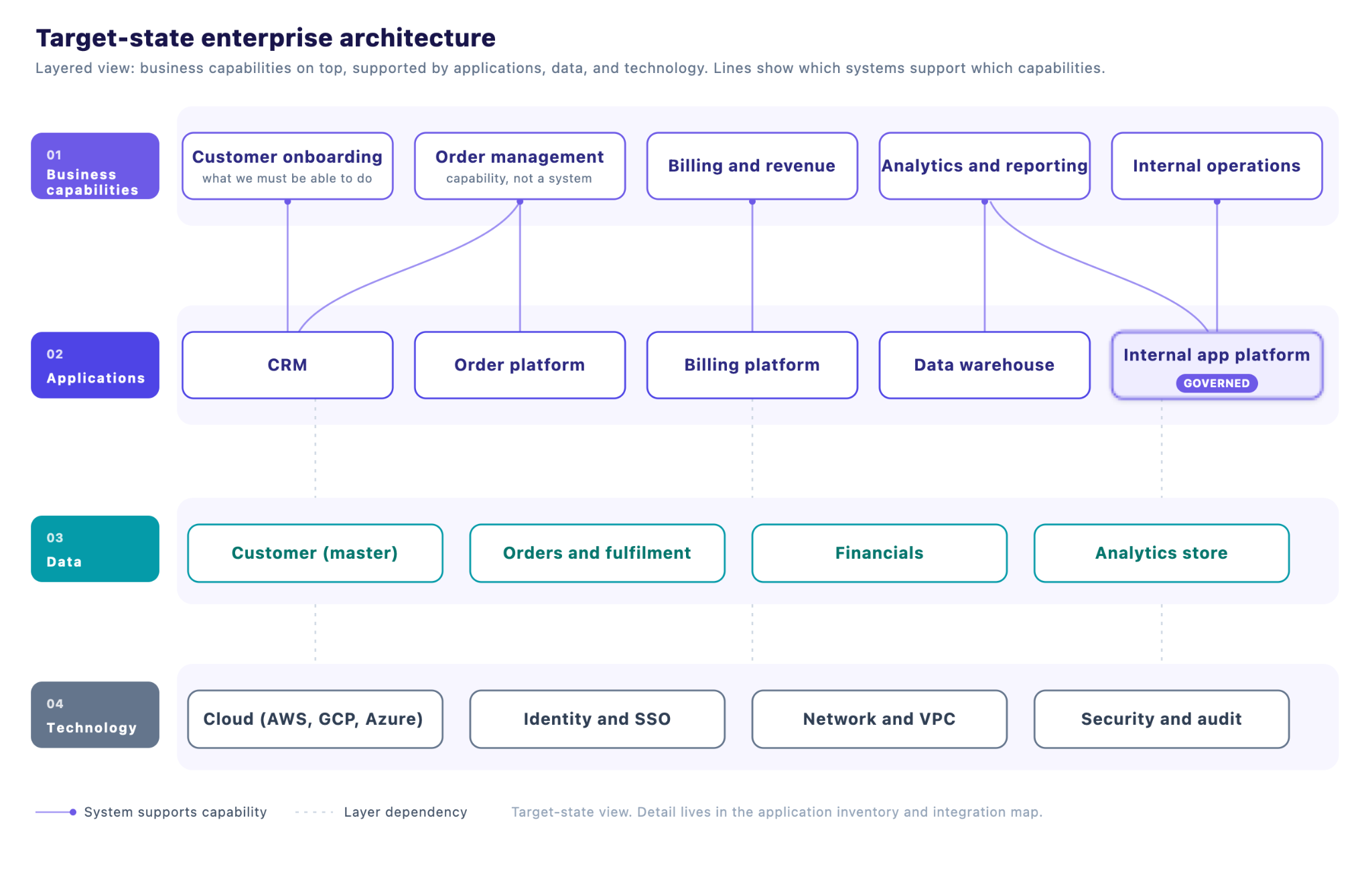
Most teams present the target state as layers like this. Keep the diagram readable on one screen and push the detail into the inventory and the integration map, where people can filter and search it.
Enterprise architecture principles that shape design decisions
Principles are the rules that let a hundred teams make consistent choices without calling the architecture team every time. Write each one with a short rationale, and keep the list short enough that people can recite it. These eight cover most enterprises:
- Business-driven: every system, integration, and platform choice traces back to a business capability or goal. If nobody can name the capability a system supports, it's a candidate for retirement.
- Standard interfaces: systems talk through documented APIs and events with shared data formats, which keeps integrations from turning into one-off point-to-point wiring.
- Secure and compliant by design: access control, encryption, and audit logging go into the first diagram. Rules like the EU's GDPR and the HIPAA Security Rule shape where data can live.
- Data as an enterprise asset: each core entity has one source of truth and a named owner, and teams read it through governed access.
- Technology agnosticism: the design names capabilities and standards first and vendors second, so you can swap a product without redrawing the architecture.
- Modular and reusable: shared services like identity, notifications, and payments get built once, and every app uses them.
- Cloud-first, with on-prem where it's required: default to managed cloud services, and keep regulated or latency-sensitive workloads wherever they need to run.
- Observable and accountable: every system has an owner, emits logs and metrics, and can be traced when something breaks at 2 a.m.
The list works best when it's wired into the artifacts. "One source of truth per entity" should be visible in the data-flow map, and the review board should check new work against it.
Is TOGAF still relevant in 2026?
Yes, TOGAF is still relevant in 2026. Most teams get the most out of its vocabulary and its checklist of what a complete architecture covers, and they adapt its process to their own delivery cadence.
The framework has also kept moving. The Open Group released the TOGAF Standard, 10th Edition in April 2022 with a modular structure and more how-to guidance, including material for Agile enterprises and digital transformation.
Where TOGAF still earns its keep
- Shared language: terms like baseline, target, transition architecture, and building block mean the same thing to your architects, your consultants, and your auditors.
- Large, regulated transformations: banks, insurers, public agencies, and post-merger integrations benefit from the rigor and the paper trail.
- Onboarding: certification gives new architects a common starting point, which shortens the "what do we mean by target state" conversations.
Where it slows teams down
- Documentation weight: running every phase of the Architecture Development Method (ADM) in full produces more deliverables than most stakeholders will read.
- Cadence: a design cycle measured in quarters struggles to keep pace with teams that ship weekly and business users who can build an app in an afternoon.
- Gatekeeping: review boards modeled on heavyweight processes tend to default to "no," and that pushes people toward shadow IT.
If your organization already speaks TOGAF, the six steps above map onto its ADM phases closely:
TOGAF also has company. The Zachman Framework is a classification grid (what, how, where, who, when, and why) for checking coverage, and ArchiMate is The Open Group's modeling language for drawing the diagrams.
The Federal Enterprise Architecture Framework is common across US government. Our enterprise architecture strategy guide compares them in more detail.
Designing enterprise architecture for AI-built apps
Shadow AI is the new shadow IT. A business analyst can now describe an app in plain language and have a working version by lunch, so the application domain grows every week in places your design never planned for.
The trend was visible before vibe coding had a name. Gartner forecast that by 2026, developers outside formal IT departments would make up at least 80% of the user base for low-code development tools, up from 60% in 2021.
IT leaders feel it directly. One VP of IT and InfoSec, at a logistics company where more than half the remote staff had started building in Replit, put it plainly to our team: keeping those production-level apps to the same standard as every other application was a real source of heartburn.
Banning the tools tends to push the building somewhere less visible. The more durable answer is to give citizen developers a governed home and write citizen developer governance into the architecture like any other domain. These five decisions do most of the work.
Treat the app platform as a building block
Add a governed platform for internal tools to the target state, the same way you'd add an integration layer or an identity provider. Business teams build there, and the platform carries the standards, so you review the platform once and every app built on it inherits that review.
Inherit identity and permissions
Apps built by business teams should use your existing SSO and role-based access, and their data access should run through approved integrations with managed credentials. When a builder changes teams or leaves, their access to everything they built changes with them.
Make the audit trail your system of record for custom apps
For every app, IT should be able to answer who built it, what data it touches, who can use it, and when it last ran. Design that inventory as a live record fed by the platform itself, so it stays current without anyone updating a spreadsheet on Fridays.
Decide where production data and inference run
For regulated data, the target state should keep app execution and AI inference inside your own cloud account. That's a technology architecture decision, and it's much easier to make before the first hundred apps ship.
Our guide to AI in the enterprise covers the data-exposure tradeoffs in more depth.
Encode your standards once
Design systems, coding conventions, security checks, and approved packages should be applied by the platform on every build. That turns your principles catalog into something the tooling enforces automatically, which is how a standard holds up once you have a few hundred builders.
Where enterprise architecture design goes wrong
1. Diagrams nobody opens
If delivery teams never look at the target-state diagram, the design has stopped guiding decisions. Put the design where the work happens: the project intake form, the review checklist, and the defaults on your approved platforms.
2. Boiling the ocean on the baseline
A complete inventory of every system in a large enterprise can take so long that it's stale on arrival. Baseline the capabilities tied to your first goals, make decisions, and expand from there.
3. Buying the tool before the process
An EA repository gives your models a home, and the harder question is what to model in the first place. Run the first design cycle in a spreadsheet and a diagramming tool, then buy the platform that fits the process you've proven.
4. Governance that only says no
A review board that blocks by default teaches teams to route around it. Give people a fast lane of approved platforms and patterns that pass review automatically, and save full reviews for changes that touch core systems or sensitive data.
How Superblocks supports enterprise architecture governance
Superblocks gives the application domain a governed home. Business teams build internal apps with AI, and IT configures the integrations, permissions, and policies once at the platform level. Here's how that maps onto the design steps.
A governed app layer for citizen developers (steps 3 and 6)
Builders use Clark by Superblocks to create apps in natural language on top of company data, and those apps run on the integrations and role-based access control IT has already set up. Imported prototypes from Claude, Lovable, and Replit move onto the same governed integrations.
Audit logs and the Superblocks MCP as your system of record (step 6)
Audit logs give admins a searchable record of activity across the organization. The Superblocks MCP server lets IT list apps, manage integrations, deploy, and manage access control from AI tools like Claude Code and Cursor.
Git-based change management (steps 5 and 6)
Each app can connect to its own Git repository for a pull-request workflow, with source control through GitHub, GitLab, Bitbucket, or Azure DevOps. AI-built apps go through the same review your engineering teams already use.
Deployment that fits your technology architecture (step 3)
Superblocks runs as Cloud, Hybrid, or Cloud-Prem. With Hybrid, production data for deployed apps stays in your VPC, and Cloud-Prem runs the full platform, including AI inference, inside your AWS environment.
Standards the platform enforces (your principles catalog)
Organization knowledge lets admins define design systems, coding conventions, and terminology that Clark follows by default. The Security Agent reviews each app for problems like hardcoded secrets and leaked sensitive data before it's published.
Most of these controls, including audit logs, SSO, VPC deployment, Git, the Admin MCP, and security agents, are part of the Enterprise plan. Role-based access control is available from the Teams plan and higher.
Design the architecture before your apps design it for you
Enterprise architecture design works best in small, finished loops. Pick the capability that's causing the most pain this quarter, baseline it this week, and draw its target state before anyone buys a tool or books a framework workshop.
The application domain is the part most likely to drift, because business teams will keep building with AI whether or not the architecture has a place for them. Superblocks gives that building a governed home inside your design.
With Superblocks, teams can:
- Build internal apps with AI on top of approved integrations and existing permissions
- Import prototypes from Claude, Lovable, and Replit into a governed environment
- Search audit logs for builds, queries, and integration changes across every app
- Query and administer apps, access, and integrations through the Superblocks MCP
- Review AI-built changes through Git pull requests before they ship
- Keep production data in your own VPC with Hybrid or Cloud-Prem deployment
- Apply design systems and coding standards automatically through organization knowledge
When the platform carries the standards, your review board gets to spend its time on the decisions that shape the target state.
Book a demo to see how Superblocks fits into your target-state architecture.
Frequently asked questions
What are the 5 components of enterprise architecture?
The five components of enterprise architecture are usually business, data, application, and technology architecture, plus security or governance as a cross-cutting layer. The four core domains appear in almost every framework, and the fifth varies by source.
What is the difference between enterprise architecture and solution architecture?
Enterprise architecture sets the target state and standards for the whole organization. Solution architecture designs one specific system or project inside those standards, so a solution architect works within the guardrails the enterprise architect defines.
Is it worth getting TOGAF certified?
TOGAF certification is worth it for architects in large enterprises, consulting, and regulated industries, where employers often ask for it. It teaches the vocabulary and structure of EA work, and the hands-on skill still comes from running real design cycles.
What is an architecture review board?
An architecture review board (ARB) is a group of architects and technology leaders that reviews significant changes against the target-state architecture and principles. A good ARB publishes its standards, reviews quickly, and records its decisions so teams know what's approved.
How do you measure enterprise architecture success?
Enterprise architecture success shows up in delivery and cost metrics: fewer redundant applications, faster project approvals, shorter integration timelines, and less spend on legacy systems. Track a handful of these against the goals you set in step one.
Will AI replace enterprise architects?
AI tools are taking over the drafting part of the enterprise architect's job, like first-pass diagrams, inventories, and documentation. Tradeoffs, stakeholder alignment, and governance decisions still need an architect's judgment, so the role is shifting toward that work.
At Virgin Voyages, non-technical teams now build their own AI apps, with IT governance fully intact. The result: 15+ production apps, seven departments onboard, and zero dedicated frontend engineers.
At Matthews, a marketing manager with zero coding background built an app that auto-generates offering memorandums, cutting turnaround from days to hours. See how the brokerage is putting AI builders on every team, with full governance intact.


Stay tuned for updates
Get the latest Superblocks news and internal tooling market insights.
Request early access
Step 1 of 2
Request early access
Step 2 of 2

You’ve been added to the waitlist!
Book a demo to skip the waitlist
Thank you for your interest!
A member of our team will be in touch soon to schedule a demo.
production apps built
days to build them
semi-technical builders
traditional developers
high-impact solutions shipped
training to get builders productive
SQL experience required
See the full Virgin Voyages customer story, including the apps they built and how their teams use them.

"Those tools are great for proof of concept. But they don't connect well to existing enterprise data sources, and they don't have the governance guardrails that IT requires for production use."
Table of Contents
%20(1).png)

Multiple authors
12 AI Agent Deployment Best Practices [2026]
AI agent deployment best practices that move an agent from offline evals to full traffic in stages, with scoped tools and a way to revoke it mid-task.
%20(1).png)
%20(1).png)